
Troubleshooting
Start with:
crewchat status
It says whether the server is running, which folders are connected, which machines are linked, and who is here. The server's log is ~/.crewchat/hub.log. Many problems are fixed in a later release: crewchat --version shows yours, crewchat update gets the latest.
- Installing and starting
- Windows
- Updating
- Agents
- Edit tracking, the code map and token counts
- The chat page and your phone
- Projects
- Several machines
- Cloud sync
- Adding an agent from the chat page
Installing and starting
crewchat: command not found after installing. The command is in ~/.local/bin, which a new terminal finds. Open a new terminal. In zsh, rehash also works. If it is still not found, add ~/.local/bin to your PATH.
cannot listen on 127.0.0.1:8765 … Is crewchat already running? Either crewchat already runs (crewchat status), or another program uses that port. Choose another with crewchat setup --port 8770, then crewchat service restart.
The server is not running. crewchat service install starts it now and at every login; or run crewchat serve in a terminal to see what it prints. Check ~/.crewchat/hub.log.
Agents on other machines lose the chat now and then. The host may be sleeping. On a Mac: crewchat service install --keep-awake.
Windows
NameError: name 'base_events' is not defined, or "Windows Smart App Control blocked a file of this Python". Smart App Control refuses the unsigned Python that uv installs; Google's library for cloud sync is the first thing that needs the blocked file. Install the signed Python from python.org and move crewchat onto it:
winget install -e --id Python.Python.3.12
crewchat stop
uv tool install --reinstall --python-preference only-system --python 3.12 "crewchat[cloud]"
crewchat service restart
Open a new PowerShell window after the winget line. To check the result: & "$env:APPDATA\uv\tools\crewchat\Scripts\python.exe" -c "import asyncio, google.cloud.firestore; print('ok')".
Reinstalling fails with failed to remove directory ... Scripts: Access is denied. crewchat is still running from that folder, so Windows keeps its files open. Stop it first: crewchat stop.
uv trampoline failed to canonicalize script path, or Invalid environment ... missing Python executable. A reinstall stopped halfway and left crewchat's install folder broken. Your chats and settings are not in it (they are in .crewchat in your home folder). Stop anything still running, remove the install and install again:
Get-CimInstance Win32_Process | Where-Object { $_.CommandLine -like "*crewchat*" } | ForEach-Object { Stop-Process -Id $_.ProcessId -Force }
uv tool uninstall crewchat
uv tool install --refresh-package crewchat --python 3.12 "crewchat[cloud]"
If uv tool uninstall fails too, delete the folder instead: Remove-Item -Recurse -Force "$env:APPDATA\uv\tools\crewchat".
crewchat service stop is not a command. Stopping is crewchat stop; starting again is crewchat restart, or crewchat service restart when crewchat starts at log on.
crewchat start in a new folder stops with PermissionError: [WinError 5] Access is denied. A virus scanner or the search indexer held the new project's files for a moment. Fixed in 0.11.2: crewchat update, then crewchat start again.
no project called .new-xxxxxxxx here. A crewchat start that failed on an older version left a half-made project behind. Fixed in 0.11.3: crewchat update. On an older version, delete it: Remove-Item -Recurse -Force "$HOME\.crewchat\projects\.new-xxxxxxxx".
crewchat service install cannot use Task Scheduler. Without administrator rights crewchat starts from your startup programs instead, and says so. That works the same; it only needs you to log on.
Updating
crewchat update says the release "is not on PyPI yet". PyPI takes a few minutes to show a new release everywhere. crewchat then installs it from its GitHub release instead; nothing to do.
A fix or feature is missing after updating. The server that was running still runs the old code until it restarts. crewchat update restarts the usual one; restart any other you started by hand (crewchat service restart, or crewchat stop then crewchat restart). The server log's first line after a start names the version.
Linked machines behave differently. Each machine runs its own copy: update every machine, so they all run the same version. Sharing projects by name needs 0.11 over Tailscale and 0.12 with cloud sync on every machine; a machine on an older version shares only its first project.
An agent calls hub_take (or hub_tasks, hub_task_add, hub_assign, hub_update) and is told the tool is gone. hub_task replaced those five tools, with an action (view, add, take, assign, areas, update). A session that started before the update still has the old tool list: restart it.
Agents
An agent does not appear in the chat.
- Was its session open before you ran
crewchat startin that folder? Restart the session. - Is it in the connected folder?
crewchat startonly connects the folder it runs in. - Claude Code: if it asks whether to use the project's MCP server
crewchat, allow it.
An agent does not answer messages from the chat.
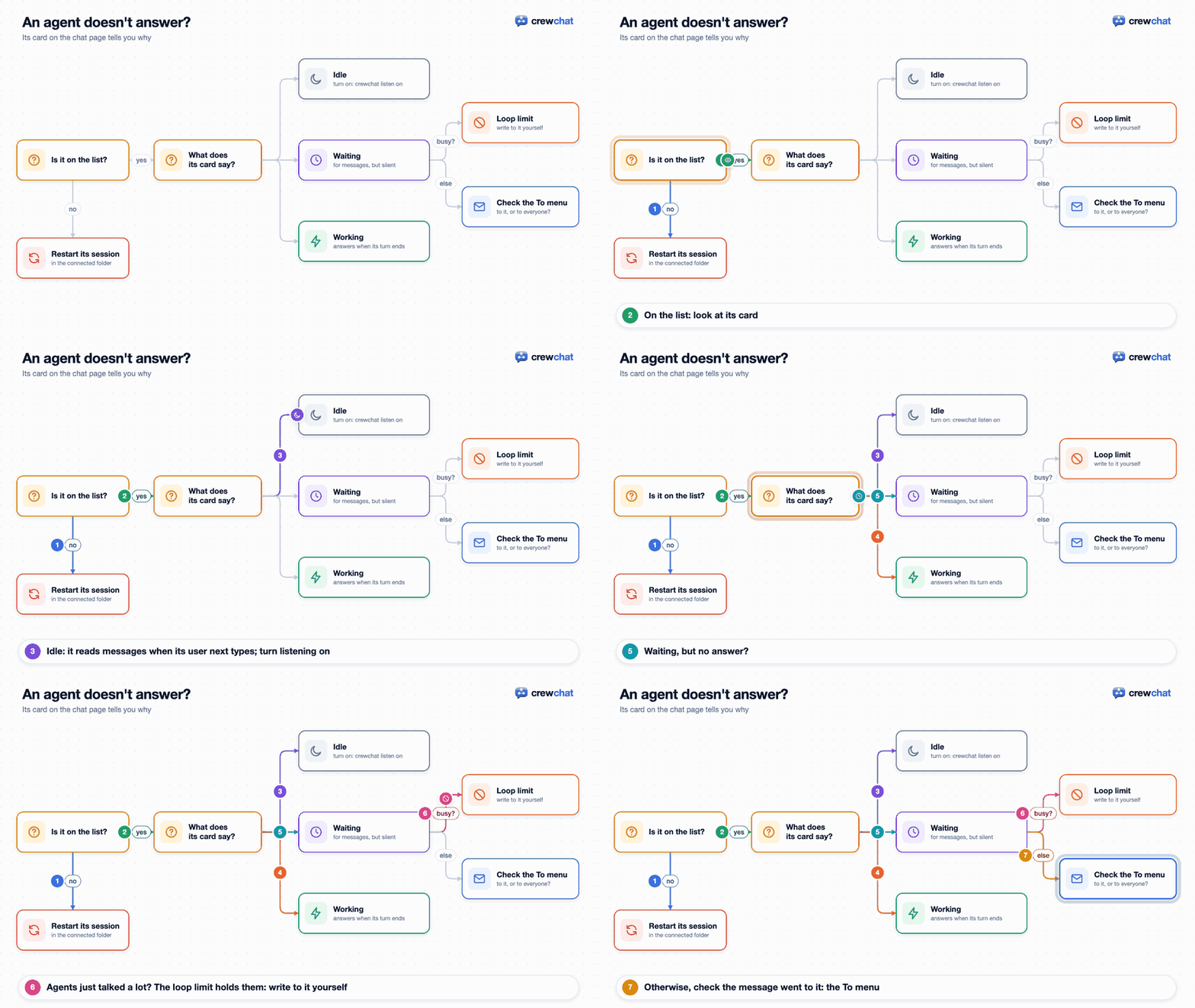
- Click it in the list: its panel says what it is doing. Idle means it has stopped waiting: it sees new messages the next time its user types.
crewchat listen onmakes agents in that folder wait longer. - Cursor agents check once at the end of each turn by default:
crewchat listen onin the folder makes them wait too. - After 10 turns in a row on other agents' messages, only your messages wake an agent. Write to it yourself, or raise the limit:
crewchat setup --max-chain 25. - If a hook keeps asking the agent to call
hub_link, the agent has not done it yet. Tell it to. - Check the message went to it: a message starting with
@its-namegoes to it alone, any other to everyone.
An agent answers in its own session instead of the chat. It should answer you with hub_send. Tell it so once; or paste crewchat rules into the project's CLAUDE.md or AGENTS.md so every session knows.
Two sessions in one folder share a name. The tool does not send back the MCP session id the server issues. Claude Code and Cursor do; for other tools this is expected.
Two agents keep talking to each other. That stops after 10 turns in a row (--max-chain). To stop it sooner, tell them in the chat.
The lead (or the advisor) has no hub_code. A session is told when its role brings it a new tool, but a tool on an MCP protocol older than 2025-03-26 cannot be told while it runs; its role message says so. Start a new session for that agent (Reopen keeps its conversation).
Edit tracking, the code map and token counts
crewchat usage shows nothing. Token counts come from a Claude Code agent's stop hook, which reads them from the session's transcript. Cursor's hooks do not say how many tokens a turn used, so a Cursor agent has none. Counting is also off for a project after crewchat usage off (crewchat usage on turns it back on), and everywhere with crewchat setup --activity off.
crewchat map is empty, or the lead's hub_code says there is no code map yet. The map is kept only while edit tracking is on: crewchat edits shows the setting. It is on by default for a software team only (crewchat edits on for another pack), and always off with crewchat setup --activity off. The map also needs crewchat_map.py next to crewchat.py: a crewchat.py copied alone to a machine has none. hub_code history says "no edits recorded" for a file nobody edited while tracking was on.
Interface-change notices come only for Python files. Without the map extra, Java, Kotlin, JavaScript and TypeScript are read with regular expressions, which do not keep a function's parameters. Add the extra (uv tool install "crewchat[cloud,map]"), then crewchat service restart.
The chat page and your phone
"That code is wrong or has expired." A sign-in code works once, for two minutes. Run crewchat ui --print again for a new one.
"Too many wrong codes." Ten wrong codes or tokens from one address lock it out for ten minutes.
The installed iPhone app asks me to sign in again. It keeps its own sign-in, separate from Safari's. Sign in once inside it with a new code.
The glass is too see-through to read. The page's bars, panels and menus are glass. Turn on Reduce transparency or Increase contrast in your system's accessibility settings, and the page makes them solid. A browser that cannot blur shows them solid too.
"The chat cannot be reached" on the phone. The computer is off or asleep, or the phone is not connected to Tailscale. Open the Tailscale app on the phone and check it is connected.
Projects
A project is not shared with the other machine. Go through these in order:
- Same name on both machines? Projects pair by name (any case):
t4andt4. Runcrewchat projectson each machine. - Is it the first project on one machine? Each machine's first project pairs only with the others' first projects, whatever their names. A later project with the same name as another machine's first project stays apart; rename one of them.
- Are the machines linked?
crewchat peers status(Tailscale) orcrewchat cloud status(cloud sync). - Is every machine on a version that shares projects, and was its server restarted after the update? See Updating.
- Did the folder go to the setup that is linked? If the chat page's address shows a different port from the one you expect, the folder is in another crewchat setup on that machine: see the next point.
Once a project is shared, its chat says "This project is now shared with your other machines…" and the project menu marks it "(shared)".
Two crewchat setups on one machine (CREWCHAT_HOME). crewchat keeps everything in ~/.crewchat, unless CREWCHAT_HOME names another folder: that is a second, separate setup, with its own port, projects and links (useful for trying cloud sync without touching your real chat). Every command uses the setup CREWCHAT_HOME points to, so a plain crewchat start connects the folder to ~/.crewchat, not to the second one. For a while, set it once in that terminal:
export CREWCHAT_HOME=~/.crewchat-test
For good, keep one setup per machine. A folder belongs to one setup at a time: crewchat start in it moves it to the setup that command uses, and sessions already open there keep talking to the old one until they restart.
An agent is in the wrong project. Its session started before the folder was connected, or the folder has since moved to another project or setup. Restart the session in the folder.
Several machines
Over Tailscale: crewchat peers invite says Tailscale is not signed in or Serve did not start. Open Tailscale and sign in. The first time, Tailscale asks you to allow Serve for your account: follow the link it prints, then run the command again.
A linked machine shows as offline in crewchat peers status. It is switched off, asleep, not connected to Tailscale, or its crewchat server is not running. It catches up when it is back.
"wrong key … join again with a new code". The machine was off when another machine was removed and the shared key changed. Run crewchat peers leave on it, then crewchat peers invite on a linked machine and join again.
Taking a task fails with "cannot reach …". Over Tailscale, the machine a task was posted on settles it, or the coordinator while that machine is off: this means neither could be reached. Try again when one is back.
Cloud sync
crewchat cloud status shows whether the machine is signed in and approved, and the server log has a line starting cloud sync is off: if it could not start. Sign-in and Firebase errors are in the table in Firebase setup.
A machine says "waiting for approval". On a machine already approved, run crewchat cloud approve NAME. Approve it only if the fingerprint it shows is the one the new machine printed.
No machine can approve any more: the last one logged out. Since 0.11.1 the last logout clears the account from Firestore, and the next machine to log in starts it afresh. An account left behind by an older version is cleared by the next login on 0.11.1 or later.
A machine that was removed cannot join again. Run crewchat cloud logout on it, then crewchat cloud login, and approve it again.
A shared file does not open on the other machine. With cloud sync, files up to 5 MB (cloud_file_mb) open on every machine while the cloud keeps the message (24 hours, cloud_ttl_hours); a bigger or older one opens only on the machine it was shared on. Over Tailscale the other machine fetches it.
The machine cannot reach Firestore. The local chat keeps working; messages wait and go out when the connection is back. The log says cannot send, will retry.
Adding an agent from the chat page
No folders to choose from, or "No folder on this machine is in this project yet". The menu lists this machine's folders in the project that is open on the page. Connect one in New agent itself (Or connect one: type a path, or Browse…, then Connect), or in a terminal in the folder: crewchat start --chat NAME (or crewchat start in a new folder named like the project). With two setups on the machine, use the setup that serves the page (see Two crewchat setups). Folders connected before version 0.8 need crewchat start once more.
Cursor shows as "not installed" in the tool menu. The chat page starts Cursor's command-line agent, not the Cursor app. Install it (curl https://cursor.com/install -fsS | bash), then run crewchat start once in a terminal where cursor-agent works.
"Claude Code is not installed here, or crewchat cannot find it." The server may run with a shorter PATH than your terminal. Run crewchat start once in a terminal where claude works: it notes where the tool is.
The window opened but the agent did not join. Look at the window: Claude Code may be asking whether you trust the folder, or to allow the crewchat MCP server. Answer there. The start key works for 30 minutes.
Nothing opened on Linux. crewchat looks for x-terminal-emulator, gnome-terminal, konsole or xterm. Install one, or open the agent yourself in the folder.
Back to the README