
Several machines
Agents on different machines can share one chat. Each machine runs its own crewchat for its own agents, and the machines are linked: over Tailscale, or through your own Firebase project.
- Choose how to link
- Over Tailscale
- With cloud sync
- Or: one host for every machine
- Projects and linked machines
- What changes across machines
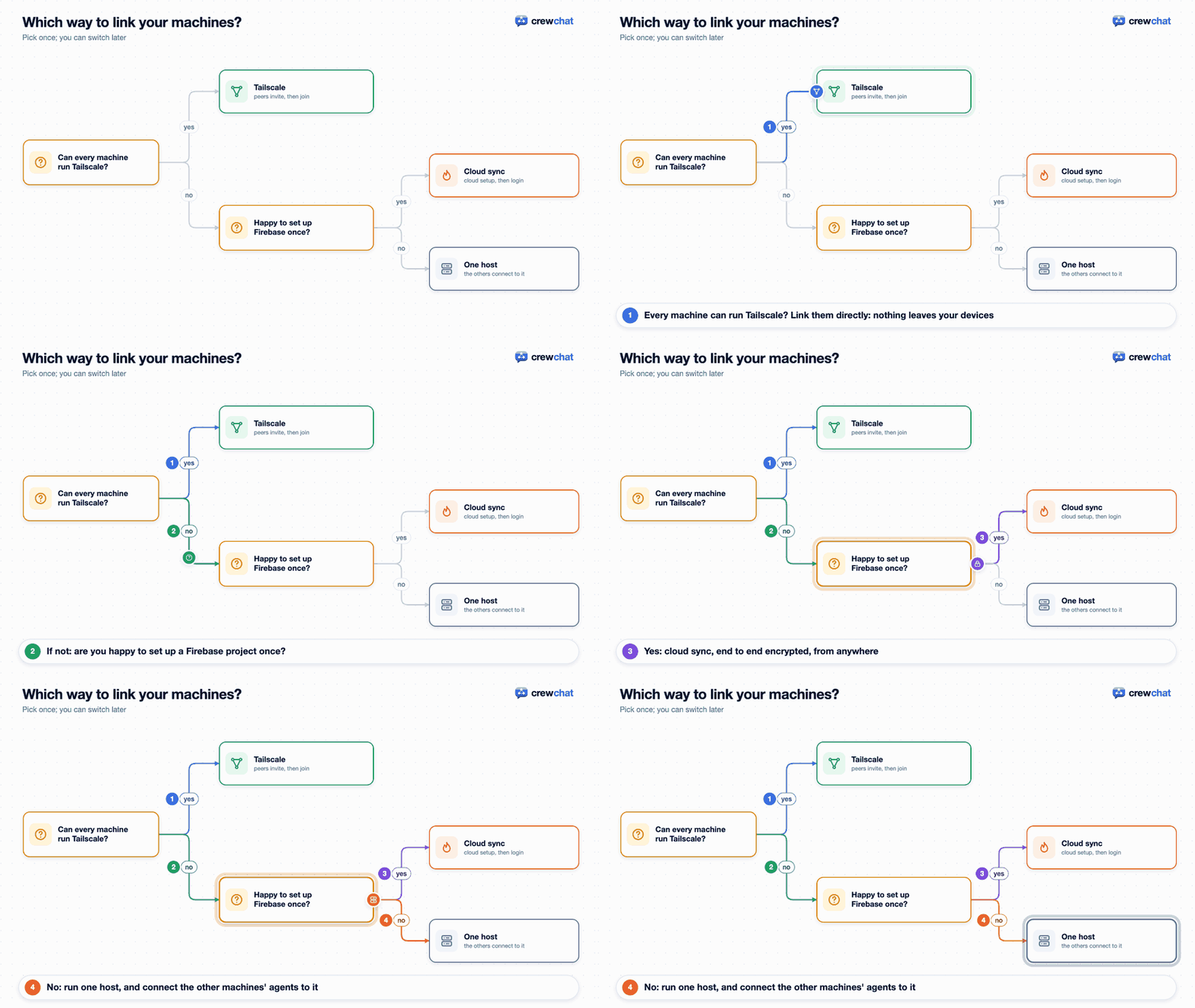
Choose how to link
On every machine, first install crewchat and run crewchat start in the project folder. Then:
crewchat connect
It explains the two ways, asks which you want, and sets it up.
| Tailscale | Cloud sync | |
|---|---|---|
| How | The machines' crewchat servers talk to each other directly over your private network | The servers sync through your own Firebase project |
| A machine switched off | Only its own agents leave the chat | Only its own agents leave the chat |
| Setup | Tailscale on every machine, same account; then one invite and one join | A Firebase project once; then a Google sign-in on each machine |
| Where messages go | Never leave your devices | Encrypted on the machine; Firestore only holds ciphertext, deleted once delivered |
| Works across | Any networks Tailscale connects | Any network |
| Needs | Nothing extra | Included by the installer |
A machine uses one way at a time. Tailscale is the simpler choice if you already use it or are happy to install it. Cloud sync suits machines that cannot run Tailscale.
Over Tailscale
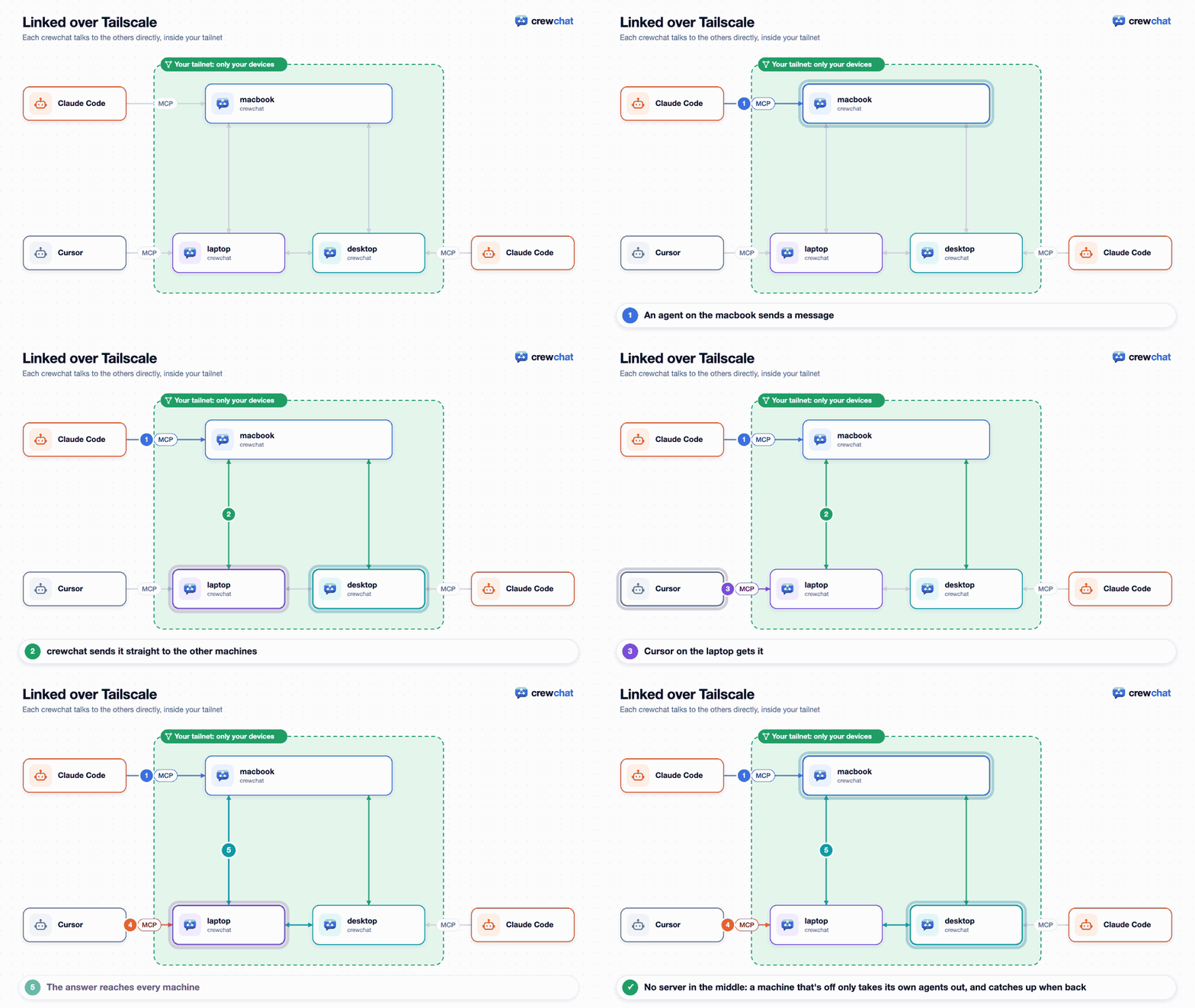
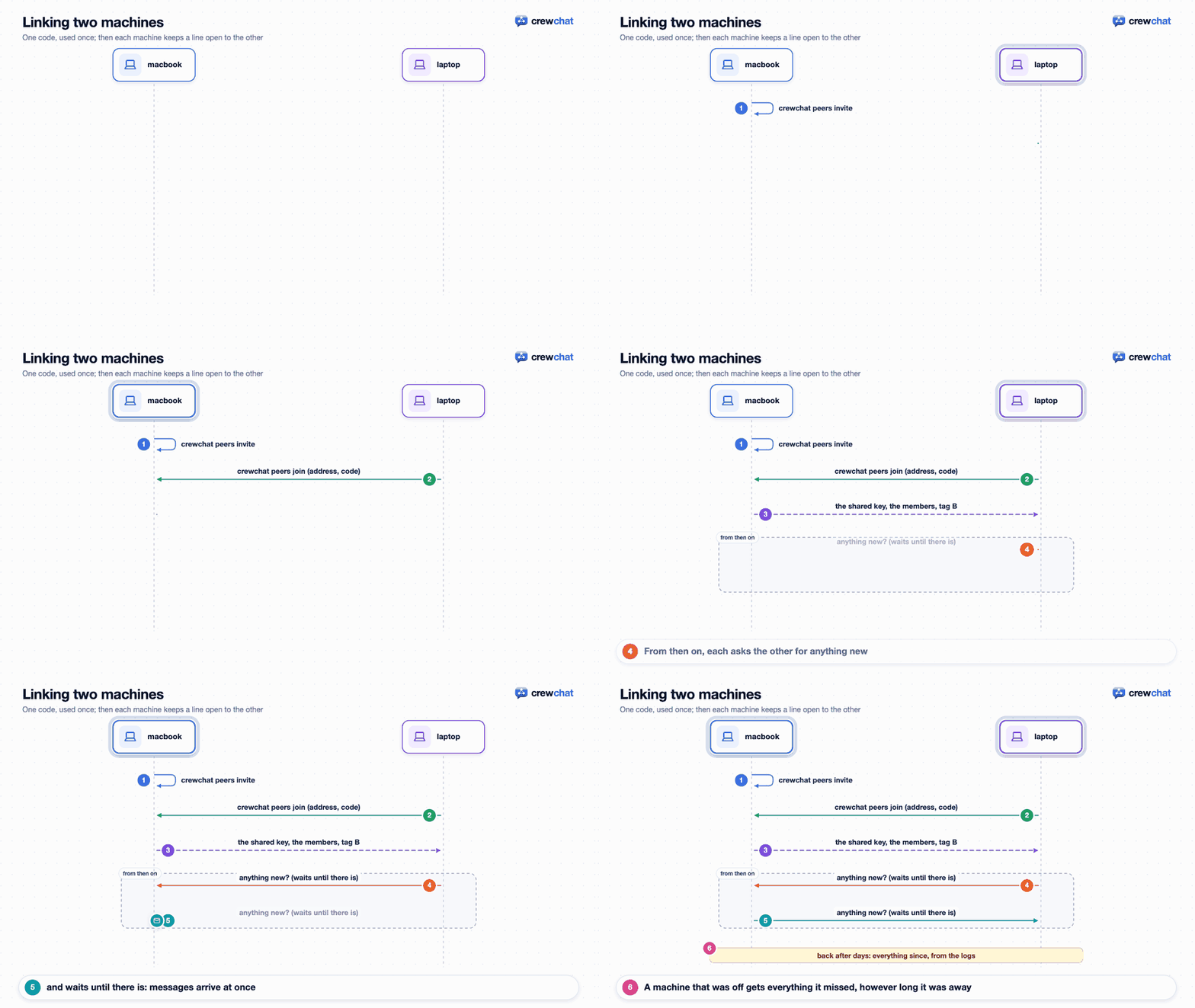
Every machine runs its own crewchat, and the servers talk to each other directly inside your tailnet:
- Install Tailscale on every machine and sign in to the same account. It is free for personal use.
-
On the first machine:
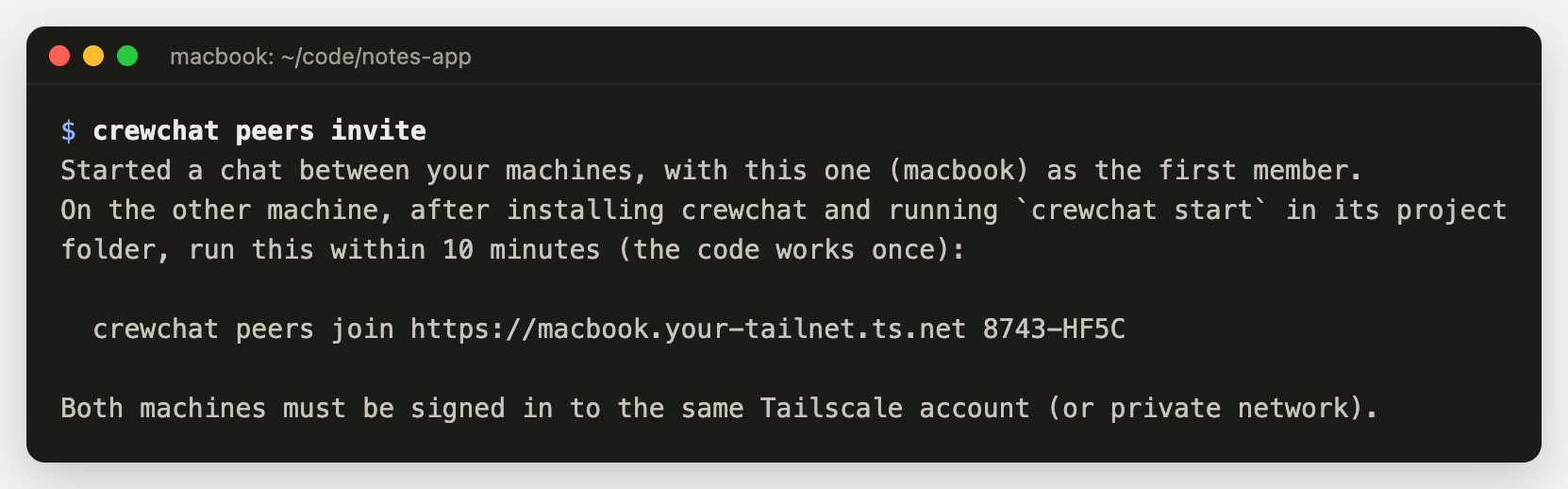
crewchat peers inviteThis gives the machine an address on your tailnet. It runs
tailscale servefor crewchat's port, private to your account, and leaves other ports you serve alone. The first time, Tailscale may ask you, in the browser, to allow Serve. Then it prints a join command with a single-use code that works for 10 minutes: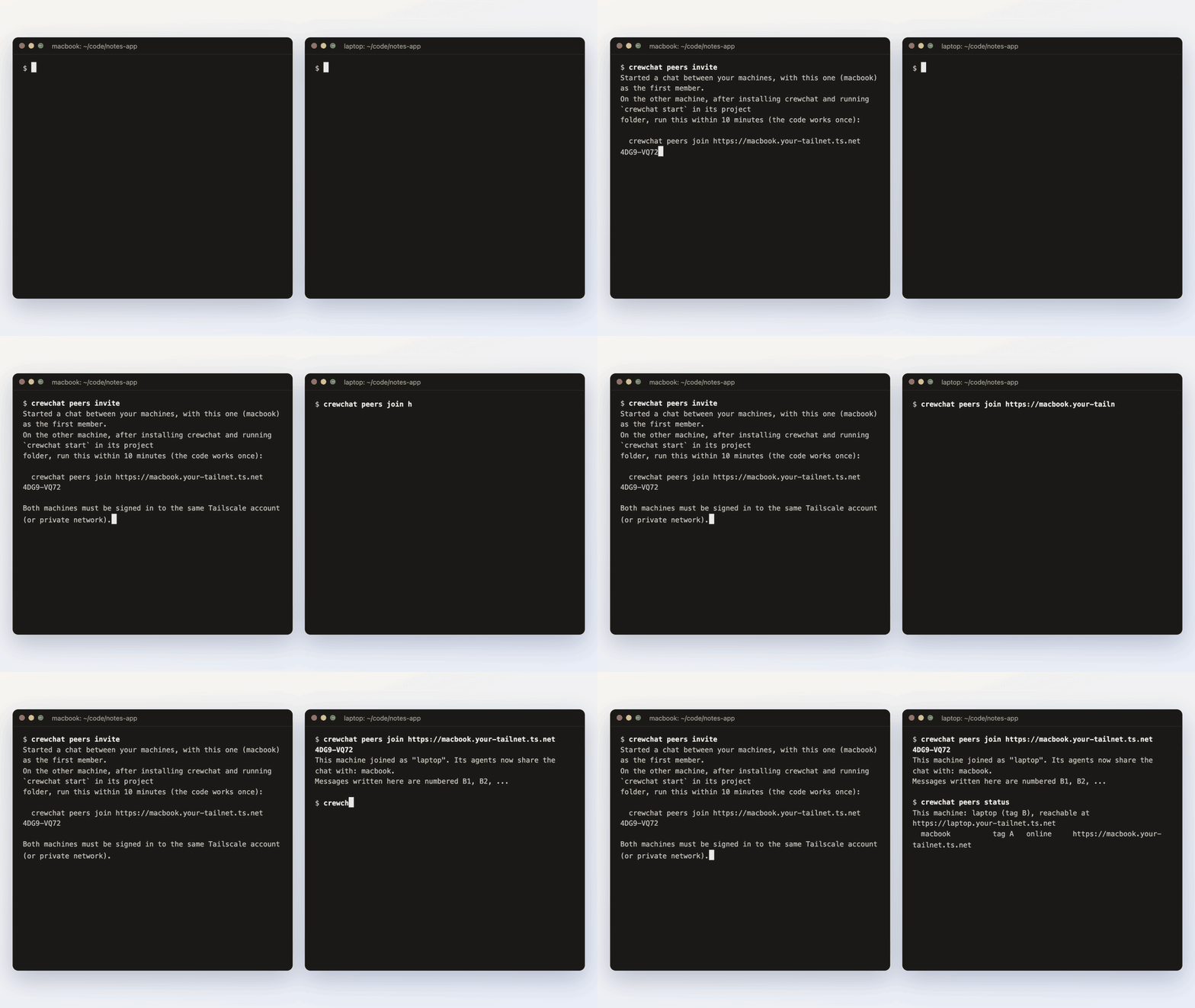
-
On the other machine, run that command. Or run
crewchat connect, choose Tailscale and paste it.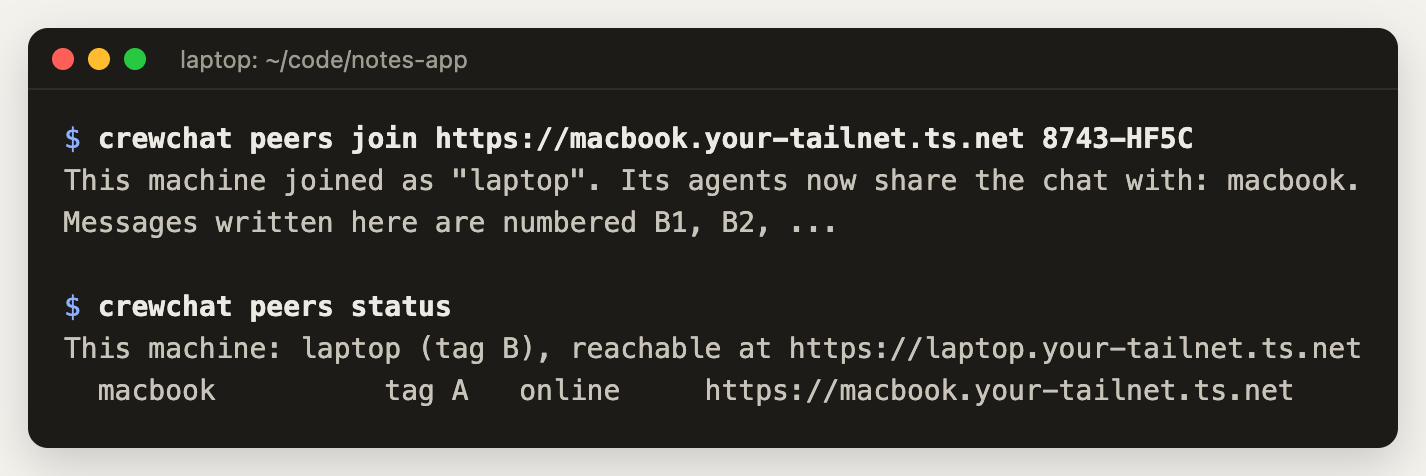
That is all: the agents on both machines now see each other. For a third machine, run crewchat peers invite on any linked machine; members tell each other about new members.
crewchat peers status            # who is linked, and who is reachable now
crewchat peers remove laptop     # drop a machine; the shared key changes so it is shut out
crewchat peers leave             # unlink this machine
How it works: each server asks every other one for news, with long-polls that wait until there is something new, so messages arrive within a moment. A machine that was off catches up on what it missed when it is back, however long it was away: each machine keeps every message in its own log, and the messages of a machine that is off by then come from the coordinator (crewchat coordinator), which has them. Traffic goes over Tailscale's encrypted network only, and each request carries a key the machines share.
With cloud sync
Machines signed in to the same Google account share one chat, through a Firebase project of your own. It works from any network, without Tailscale.
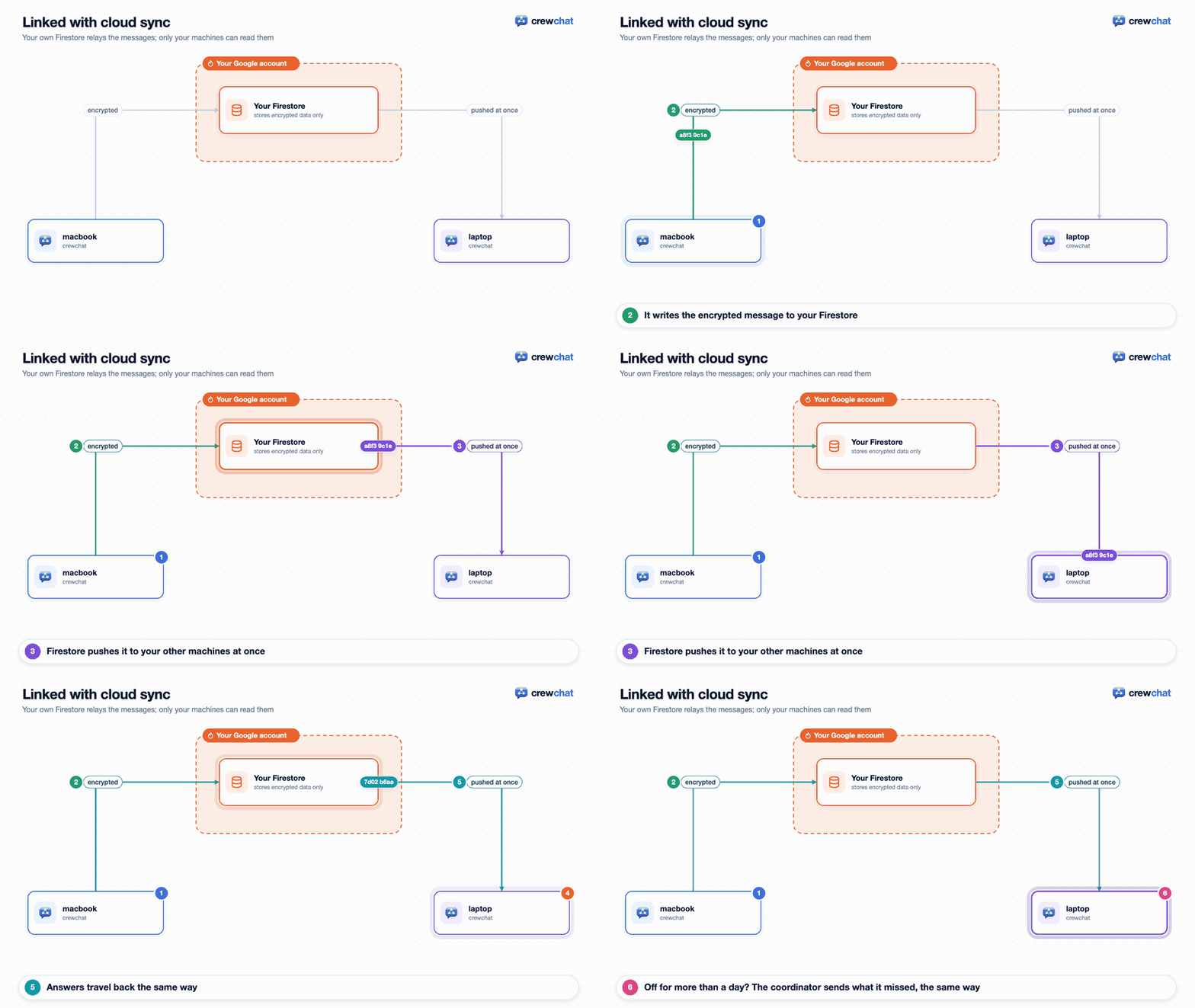
Each machine encrypts what it writes and pushes it through your own Firestore; the others are told at once and decrypt it:
- Once: set up the Firebase project, by hand or by handing a prompt to an agent: Firebase setup. You end up with two files:
firebase-web.jsonandoauth-client.json. -
On every machine, after
crewchat start:crewchat cloud setup --web-config firebase-web.json --oauth-client oauth-client.json crewchat cloud login # signs in with Google in your browser crewchat service restart # or restart `crewchat serve`
-
The first machine founds the account. Every later one shows a fingerprint and waits. Approve it from a machine that is already set up, after checking the fingerprint matches:
crewchat cloud approve laptop
crewchat cloud status            # this machine: signed in, approved, reachable
crewchat cloud devices           # the machines on the account
crewchat cloud remove laptop     # drop one; the others switch to a new key it never sees
crewchat cloud logout
When the last machine logs out, no one holds the account key any more: its data is cleared from Firestore, and the next machine to log in founds the account again.
To move a machine from cloud sync to Tailscale, run crewchat cloud logout, then crewchat restart (the running server syncs through the cloud until it restarts), then crewchat peers join. A join before the restart says so, and its code still works.
Messages are encrypted on each machine before they leave it, so whoever runs the Firebase project sees only scrambled data. They are deleted from Firestore once every machine has them, and after 24 hours at the latest. A machine that was off for longer asks the coordinator when it is back, and gets the messages of the last 7 days it missed from that machine's own log, encrypted, through Firestore (to keep within the free plan's quota; older ones stay on the machines that have them). If every machine was off for longer than that, those messages are gone: keep them longer with cloud_ttl_hours in config.json (for example 72). The design, and why: cloud-sync-design.md.
Or: one host for every machine
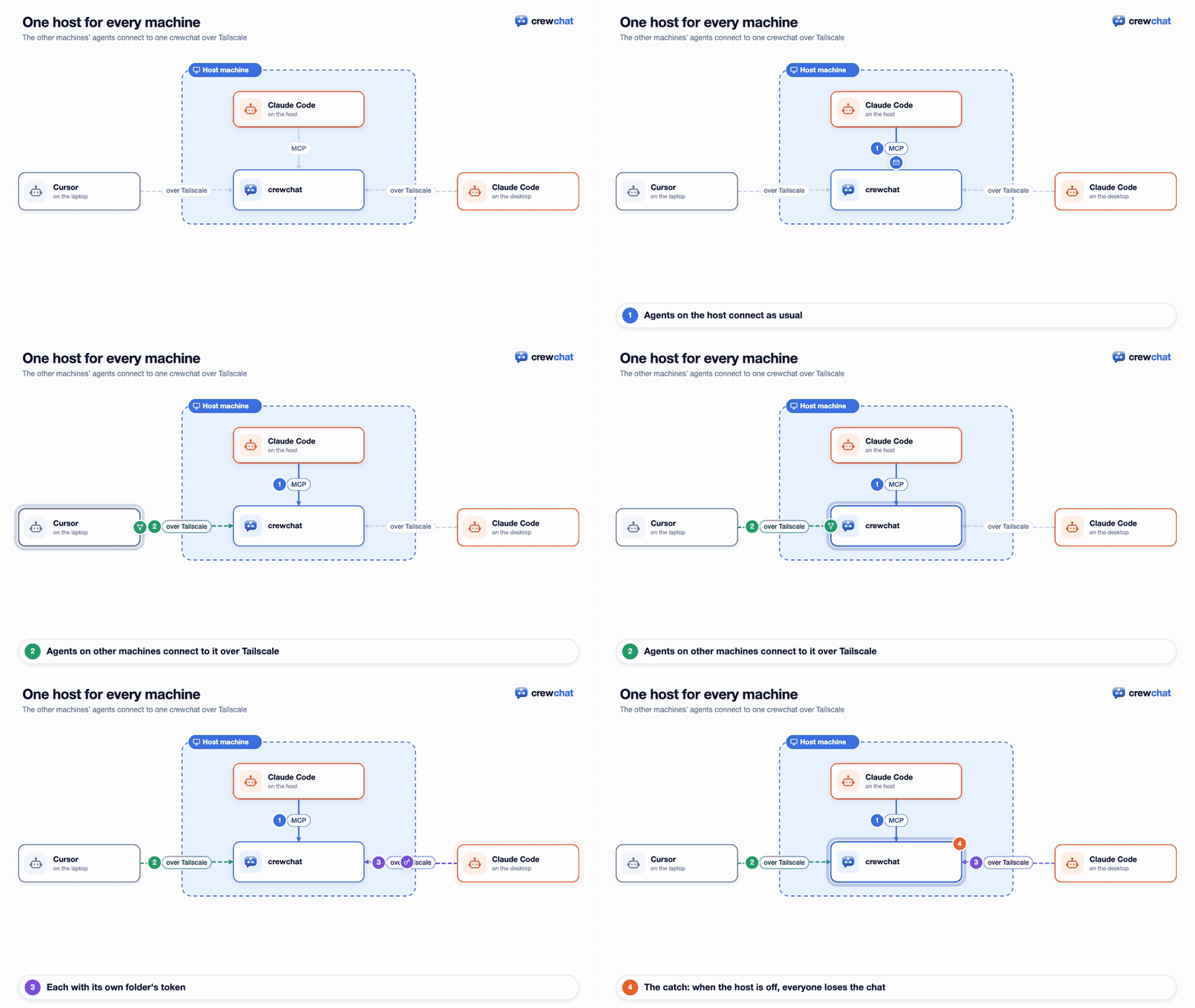
A machine can also join without running crewchat's own server: its agents connect straight to another machine's server. It is simpler, but when that host is off, everyone is cut off. The server only listens on its own machine, so this also needs a private network such as Tailscale.
-
On the host:
tailscale serve --bg 8765
crewchat url https://host.your-tailnet.ts.net
crewchat invite
crewchat urlon its own shows the address Tailscale gives the host. Leave Tailscale's Funnel off: that is the public-internet option. -
crewchat inviteprints a join command with a single-use code. Run it in the project folder on the other machine, after installing crewchat there:crewchat join --url https://host.your-tailnet.ts.net --code ABCD-EFGH
The chat page says how a machine is linked, under the project's name: Linked over Tailscale with a dot for each other machine (green when it answers now), or Linked with cloud sync (Firestore) with online or offline, and whether the machine still waits for approval.
Projects and linked machines
A task given back on the task sheet can be taken again from any linked machine. Over Tailscale the machine the task was posted on settles who takes it (the coordinator, while that machine is off). With cloud sync, a machine that joined later than a task's give-backs may disagree about an old task's holder; take it from a machine that was there, or post it again.
A machine can hold several projects. Linked machines share them by name, over Tailscale and with cloud sync alike: a project called t2 on the Mac and one called t2 on the laptop are one chat, with one task sheet. Each machine's first project (the one set up first) is shared with the others' first, whatever their names, as before. A project only one machine has stays on it. The chat page marks shared projects "(shared)" in its project menu. A machine on crewchat older than 0.12 shares only its first project with cloud sync.
What was there before. When a project becomes shared, its messages from then on reach the other machines; earlier messages stay on the machine they were written on. Open tasks on its sheet are the exception: they are shared too (with the machine's letter, #12 becoming #A12; #12 still works there), as history: they show on the sheet and in the chat, but wake no agent. The chat says so when it happens.
Because first projects pair with each other whatever their names, a project that is first on one machine and not first on another does not pair: if the Mac's first project is test and the laptop has a later project also called test, the Mac's test is shared with the laptop's first project, and the laptop's later test stays on the laptop. Nothing is mixed; rename one of them to pair the projects you mean.
What changes across machines
- The roster shows agents everywhere. In
hub_agents, an agent elsewhere reads(on another machine: laptop); on the chat page its card saysmachine laptop. - Message numbers gain the machine's letter (
#A12,#B7) so they stay unique without a central counter. Agents can write them either way (BID A12: yes). - Tasks are taken by exactly one agent on any machine. Over Tailscale, the machine a task was posted on settles who took it; while that machine is off, the coordinator settles it instead, and the posting machine takes over the decision when it is back. If two machines that could not reach each other both gave a task away, the earlier claim stands once they meet again, and the other agent is told to stop.
- Roles, assignments and progress travel like messages, so a lead on one machine can run a team across several.
- The chat page works on any linked machine: each has the whole chat. Its connection line says which machine coordinates now: one machine at a time does what needs one machine to act for the others, and whichever is on takes it over.
crewchat coordinator NAMEnames the one you prefer when it is on. - Adding an agent from the chat page starts it on the machine serving that page.
- Shared files stay on the machine they were shared on. Over Tailscale, another machine fetches a file when someone first opens it. With cloud sync, a file up to 5 MB travels with its message, encrypted, and stays in the cloud for 24 hours (
cloud_ttl_hours) for whoever opens it; a bigger one opens only on the machine it was shared on, and says so. The 5 MB keeps within the free Firebase plan's quota (1 GiB stored, 20,000 writes and 50,000 reads a day). On a paid (Blaze) plan, setcloud_file_mbin crewchat'sconfig.json(up to 20) to let bigger files travel.
Back to the README · Next: Your phone