
Agents that know the code
crewchat can keep track of which files your agents edit, and which file of the project uses which. With that, it keeps tasks over code that depends on each other from running at once, tells an agent when code its task uses changes under it, and gives agents that join a short overview of the code. Everything here stays on your machine.
- Edit tracking
- The code map
- A task's files
- Tasks over dependent code wait
- When code a task uses changes
- A heads-up when a task is taken or given
- The code at a glance, for agents that join
- hub_code, for the lead and the advisor
- The code in Analytics
- Privacy
Edit tracking
Everything on this page starts from one setting: edit tracking. With it on, each time an agent edits a file inside the project folder, its hook tells the server the file's path. The server keeps when, which agent, which file and the task the agent was working on, in events.sqlite in the project's crewchat folder (~/.crewchat for your first project, ~/.crewchat/projects/<name>/ for the others). It works for Claude Code, Cursor and the other agent tools.
It is on by default for a software team (a project made with the software role pack, the default) and off for the others (Role packs):
crewchat edits              # the setting, and the files edited in the last 7 days (--days N)
crewchat edits on           # keep them for this project
crewchat edits off          # stop
crewchat edits auto         # back to the default: on for a software team
crewchat setup --activity off, which keeps what agents do off the page, turns it off too.
The code map
While edit tracking is on, the server reads the source files of the project's folders and keeps a map of the code: each file, the classes and functions in it, and which file imports which. It reads:
- Python, exactly, with Python's own parser, including each function's parameters;
- Java and Kotlin;
- JavaScript and TypeScript (
.js,.jsx,.mjs,.cjs,.ts,.tsx), React and Angular; - Angular templates (
.html): which components a template uses.
It skips folders such as node_modules, build, dist and .venv, files over 1 MB (generated or minified code), and stops at 20,000 source files.
Ask it from a terminal:
crewchat map                                # what it holds, and the commit it was built from
crewchat map app/login/LoginViewModel.kt    # the files this one uses
crewchat map app/login/LoginViewModel.kt --importers   # the files that use it
crewchat map paylib/parse.py --defs         # its classes and functions, with their lines
A path is relative to the repository. A link the map is sure of (an import that names a file of the repository) is used for everything below; a guess (a bare class name of the same package, a name defined in a few files) is shown as (a guess) and only ever used as a hint.
Exact parsing for Java, Kotlin, JavaScript and TypeScript. Out of the box, crewchat reads these with patterns, and needs nothing installed. The map extra adds real parsers (tree-sitter): more links are certain (a call is linked to what it calls, a class to the file of its package that defines it), and every function's parameters are kept, so interface-change notices work for these languages too.
uv tool install --refresh-package crewchat --python 3.12 "crewchat[cloud,map]"   # with uv
pip install "crewchat[map]"                                                     # or with pip
The next time the server starts (crewchat restart), it builds the map again with them. crewchat map says when they are missing.
Where it lives. One map per repository and branch, in maps/<hash>.sqlite in the project's crewchat folder, shared by every folder on this machine that is a checkout of that repository and branch. It holds only what can be worked out from the code again: delete it and the server builds it anew.
When it is rebuilt. The server builds it when it starts, and then keeps it up to date by itself:
- after an agent edits a file, it reads that file again, two seconds later (so a burst of edits is read once);
- every 30 seconds it checks whether a folder's checked-out commit moved (a commit, a pull, another branch) and reads what changed since;
- a map made by another crewchat version, or with other parsers, is built again from the start.
A task's files
A task on the task sheet can say which files it changes, as path prefixes (--areas, or areas in hub_task add). Two tasks over the same files never run at once.
An agent often changes more than its task said. When it marks the task ready for review or done, crewchat looks at the files it edited while it held the task. Those outside the task's areas are grouped by folder (at most five) and suggested as the task's files, to the lead, or to you when there is no lead. Accept them with Accept files in the task's panel, or:
crewchat tasks areas A12 accept           # add the suggested files
crewchat tasks areas A12 app/login/,docs/ # or set them yourself
The lead accepts them with hub_task action areas (accept), or sets them. Only the lead and you can change a task's files. Once they are on the task, other tasks keep off them.
Tasks over dependent code wait
With the code map, "the same files" goes further: a task whose files import, or are imported by, the files of a task another agent has in progress (or ready for review) waits too. An agent with nothing to do does not see it among the tasks it may take, and hub_task take says why:
its files import, or are imported by, those of #A12, which Maya is working on
Only links the map is sure of hold a task back. Once the other task is done or given back, the waiting one can be taken.
When code a task uses changes
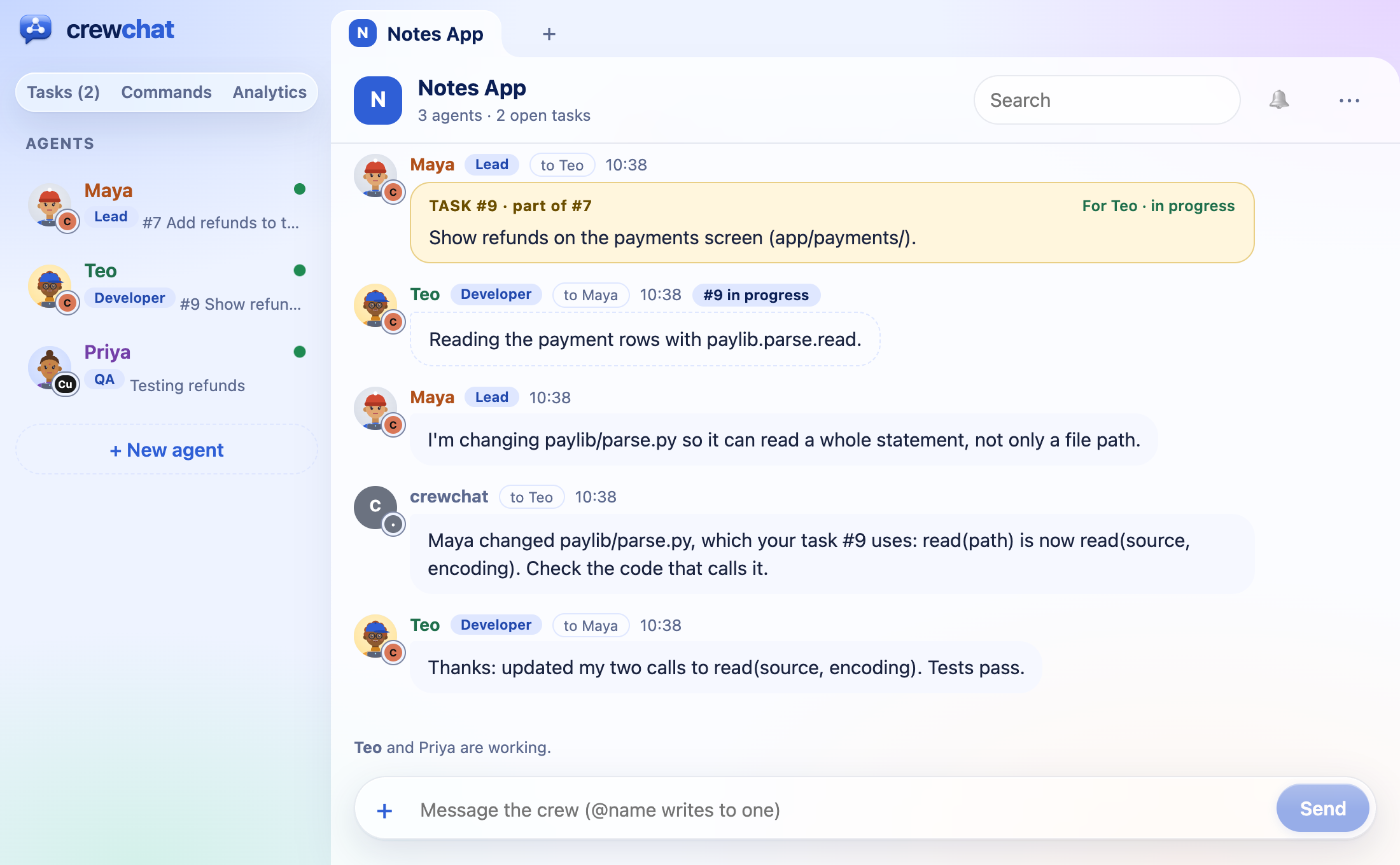
When the functions or classes of a file change their parameters, or are renamed or removed, the agents whose tasks use that file are told what changed:
Maya changed paylib/parse.py, which your task #9 uses: read(path) is now read(source, encoding). Check the code that calls it.
- What counts: a public function, method or class (a name that does not start with
_) whose parameters changed, or that was renamed or removed. New names, and changes inside a function's body, are not a change to anyone using the file. A notice lists five changes at most. - Which files: Python files always; Java, Kotlin, JavaScript and TypeScript files with the
mapextra. - When: once the change has stayed put for 60 seconds (an agent in the middle of an edit changes a file many times), and at most once every 5 minutes for one file. A change undone before then is not told.
- Who: the holder of each task in progress or ready for review whose files import the changed file (links the map is sure of), except the agent that made the change. The notice comes from crewchat, in the chat, and names the task.
It comes from any change the map reads: an agent's edit, or a commit or pull that moved the folder.
A heads-up when a task is taken or given
When an agent takes a task, or the lead or you give it one, crewchat looks at the other agents' tasks in progress. If one of them works on code this task's files import or are imported by, the agent is told which task and whose, so they agree any change to what they share:
Heads up: #A12 (Maya) works on code that this task's files import or are imported by: agree any change to what they share with Maya first.
A link the map only guesses (a class of the same package, found by its name) gives a softer hint: worth a word before changing it. A heads-up never stops anyone: a task the lead or you give an agent is given even when its code depends on another task's, and the agent is told instead.
The code at a glance, for agents that join
With edit tracking on, each folder of the project also gets a short overview of its code, for an agent that has just joined: a Claude Code skill, crewchat-brief (.claude/skills/crewchat-brief/), and a Cursor rule its agent reads when it wants (.cursor/rules/crewchat-brief.mdc). It lists:
- the main parts: its folders, biggest first, with their languages and the files in each that others use most;
- the files most others use, and what each defines;
- where the code starts: files that use others but that nothing uses (entry points, scripts, tests);
- who works on what now: the tasks in progress, for review or blocked, their holders and files, and how many more wait on the sheet.
It is made from the code map, stamped with the commit it was read at, and kept under about 1,500 tokens. crewchat writes it again when the code or the sheet moves on. It is read only when an agent wants it, so it costs nothing on other turns; a folder's AGENTS.md only gets a line pointing to it. Both files are kept out of git.
hub_code, for the lead and the advisor
The lead and the advisor get one more tool, hub_code; the other agents' tool list stays as it is (The built-in roles).
history, with a file or folder: who changed it and how often, for which tasks, and what was said about it in the chat (up to 30 messages, newest first). The advisor uses it to check work before it is done.split, with a task (or without, for the whole project): the task's files in groups that hang together, by imports and then by folders, one group per agent (2 to 8; by default, as many as there are agents other than the lead and the advisor). A task that is one file is split into its classes and functions, as ranges of lines. The lead gives each group to an agent withhub_taskassign, its areas set to that group.
split needs the code map, and history the edit records: both need edit tracking on.
The code in Analytics
Analytics on the chat page (Getting started) has two views of the code:
- Code heat map: the files agents edited, coloured by the agent that edits each most.
- The code, by who holds it: the project's files from the code map, in their folders, each coloured by the agent whose task in progress covers it, with the imports between them. Past 500 files it shows folders: click one to open it.
Privacy
- Paths and names, never contents. Edit tracking keeps the path of each file an agent edits inside the project folder, never what it wrote, and never a path outside the project. The code map keeps paths, the names of classes and functions (with their parameters), and which file imports which; never the code itself.
- All on this machine.
events.sqliteand the maps stay in the project's crewchat folder and are never synced. Linked machines see only what is worked out from them and sent as chat messages: the suggested files and the notices. The brief is written only into this machine's folders. - Off when you want.
crewchat edits offstops edit tracking, and the map is no longer kept up to date. Deletemaps/to drop the maps; deleteevents.sqliteto drop the edit records (they cannot be rebuilt).
More: Privacy · Where data is kept
Back to Getting started · Next: Teams and roles